
Cloud POS for Bars and Restaurants
The POS that already knows your menu and tables
A cloud POS built for hospitality: charge by table or by product, send orders straight to the kitchen and close the till at the end of the shift. All connected to the menu you already have, nothing duplicated.
Verifactu-compatible from day one, no extra setup.
Benefits
Why this POS and not another
Uses the menu you already have
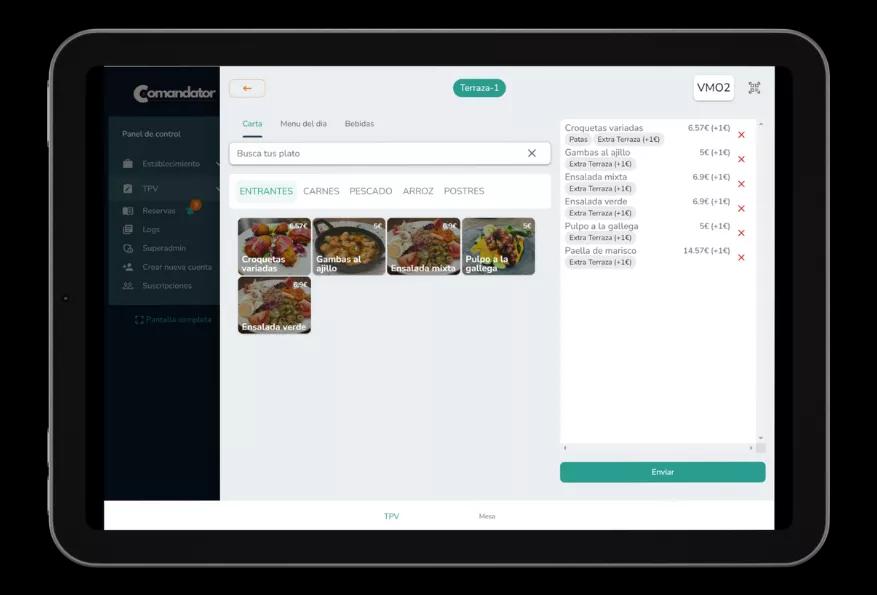
The POS pulls from the same digital menu, with its categories, prices and photos. No need to create products twice.
Charge from any tablet or phone
Works on tablet, phone or computer with no mandatory specific hardware. Add another checkout point whenever you need one.
Orders sent straight to the kitchen
Every order goes to the kitchen printer or the KDS screen instantly, no shouting orders or lost slips of paper.
Verifactu invoicing included
Issue tickets and invoices already compatible with Verifactu, no separate installs and no worrying about the regulation.
A clear till close every day
At the end of the shift you see sales, payment methods and mismatches at a glance, no adding up tickets by hand.
Connected with the rest of Comandator
Reservations, promotions, loyalty and QR orders use the same POS and the same database, no separate silos.
How it works
How the POS works day to day
- 1
Open the table or the ticket
Pick the table from the floor plan or open a direct ticket for bar sales or takeaway.
- 2
Add items from the menu
Search or browse by category just like on your digital menu, with modifiers and extras where the dish has them.
- 3
Send the order to the kitchen
The order reaches the printer or the kitchen screen instantly, no need to walk over and say it in person.
- 4
Charge and close
Charge in cash, card or whichever method you use, issue the ticket with Verifactu and move on to the next table.
In detail
What's included in the POS
FAQ
Frequently asked questions about the POS
Do I have to create products again in the POS?
No, the POS uses the same digital menu you already have, with prices, categories and photos. Any change to the menu shows up instantly.
Is it compatible with Verifactu?
Yes, invoicing is Verifactu-compatible from day one, with no extra installs or extra setup on your side.
Can I use it on several tables or checkout points at once?
Yes, several devices can work at the same time on the same floor and the same till close, each with its own user.
Related features
Everything connects: these features work alongside this one.
Try the POS connected to your menu
Charge, send to the kitchen and close the till from a single system.