
Promotions and Discounts for Your Menu
Deals that apply on their own, no recalculating
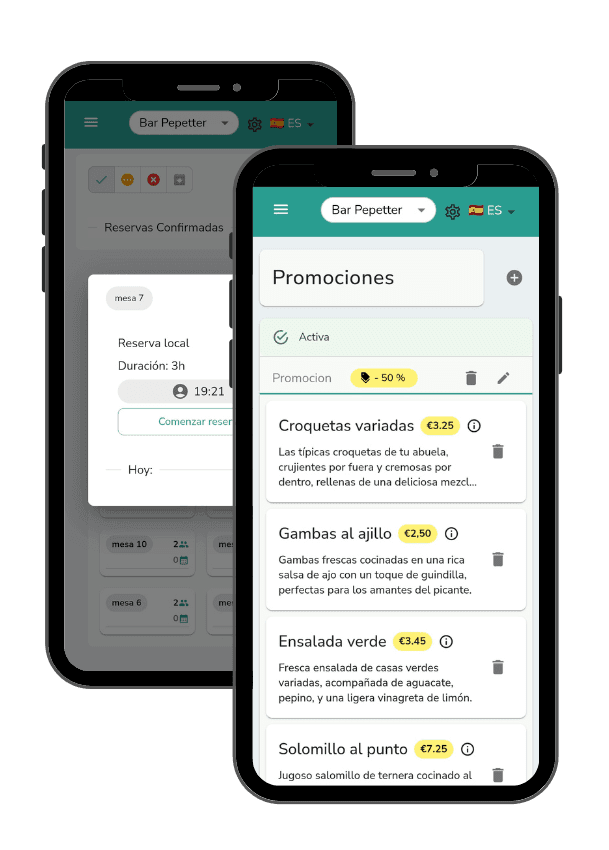
Set up 2-for-1 deals, percentage discounts or combos and Comandator applies them automatically at the POS, on the digital menu and on QR orders. No changing prices by hand or reminding staff.
Turn promotions on and off whenever you want, by time slot or by day.
Benefits
Why use promotions in Comandator
Applied without anyone having to remember
Staff ring up the sale as usual and the discount kicks in on its own. No more relying on someone remembering the deal at the till.
Fewer quiet hours, more full tables
Schedule a 2-for-1 on beers from 6 to 8pm or a discounted weekday menu to fill your slow hours.
Combos that raise the average ticket
Bundle a dish with a drink or a dessert at a fixed price and sell more per table without haggling.
Visible on the menu, no fine print
Customers see the discounted price right on the digital menu, no need to ask if there's an offer.
Full control over when they apply
By day of the week, by time slot or for the whole service. You set the rules, the system enforces them.
How it works
How promotions work
- 1
Choose the type of promotion
2-for-1, a percentage discount, or a combo of several products at a fixed price.
- 2
Set which products and when it applies
Pick the dishes or categories and, if you want, limit it to certain days or hours.
- 3
It activates on its own at POS, menu and QR orders
From then on, every sale that meets the conditions gets the right price automatically.
- 4
Edit or turn it off whenever you want
Change the conditions or disable the promotion from your phone at any time, no need to wait for closing.
In detail
What's included in promotions management
FAQ
Frequently asked questions about promotions
Can I limit a promotion to certain hours?
Yes. You can schedule it by time slot and day of the week, for example only Monday to Thursday from 6 to 8pm.
Do customers see the promotion before ordering?
Yes, on the digital menu and on QR orders the discounted price shows up directly, without customers having to ask.
Can I have several promotions active at once?
Yes, you can combine several promotions on different products or categories at the same time, each with its own conditions.
Related features
Everything connects: these features work alongside this one.
Set up your promotions today
Configure them once and let them apply automatically on every sale.