
Daily Menu and Combo Menus
Your daily menu ready every morning
Set up starters, mains, desserts and drinks once, then change each day's dishes in seconds. Your staff and your customers always see the right menu, with no confusion.
Also works for combo menus and offers with extras.
Benefits
Why it simplifies your day
Changing the menu takes seconds
Update today's dishes from your phone before opening. No need to rebuild the whole menu every time.
Fewer questions from staff
The daily menu shows up complete on the POS and the digital menu, with what's available today. No one needs to check with the kitchen.
Combo menus with extras
Define combos with add-ons, like an extra dessert or a drink swap, and the price adjusts automatically at checkout.
Sell out a dish with one tap
If a starter runs out mid-morning, mark it as sold out and it disappears from the menu and the POS instantly.
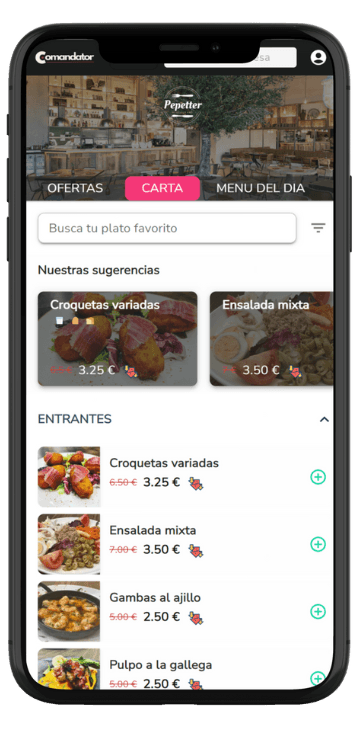
Customers see the daily menu at the table
With the digital menu or QR ordering, customers see the current daily menu without anyone reciting it to them.
How it works
How the daily menu is organized
- 1
Set up the structure once
Starters, mains, desserts, drinks and the menu price. This base stays in place, no need to repeat it every day.
- 2
Change the dishes each morning
Add or remove dishes from each group in seconds, from your phone or computer, before service opens.
- 3
It's published on POS and digital menu
The updated daily menu appears automatically wherever you need it: POS, handheld ordering and QR menu.
- 4
Adjust on the fly
If a dish sells out or an extra's price changes, update it once and it refreshes across every point of sale.
In detail
Everything it includes
FAQ
Frequently asked questions about the daily menu
Does it work for combo menus with a surcharge, not just the daily menu?
Yes. You can build combos with optional extras, like swapping the dessert or adding a drink, and the price adjusts automatically at checkout.
Do staff see the updated daily menu on the POS?
Yes, as soon as you change the day's dishes it updates automatically on the POS and on handheld ordering, with no need to tell anyone.
Can I mark a dish as sold out mid-morning?
Yes, with one tap it disappears instantly from the menu, the POS and QR orders, so it stops being sold.
Related features
Everything connects: these features work alongside this one.
Set up your daily menu in minutes
Set up the structure once and change the dishes every morning in seconds.